.BwweyAj6_ZJlM9M.webp)
Notes are now available in analytics views!
We bring you the latest updates for Amethyst.
Notes are now available in analytics views
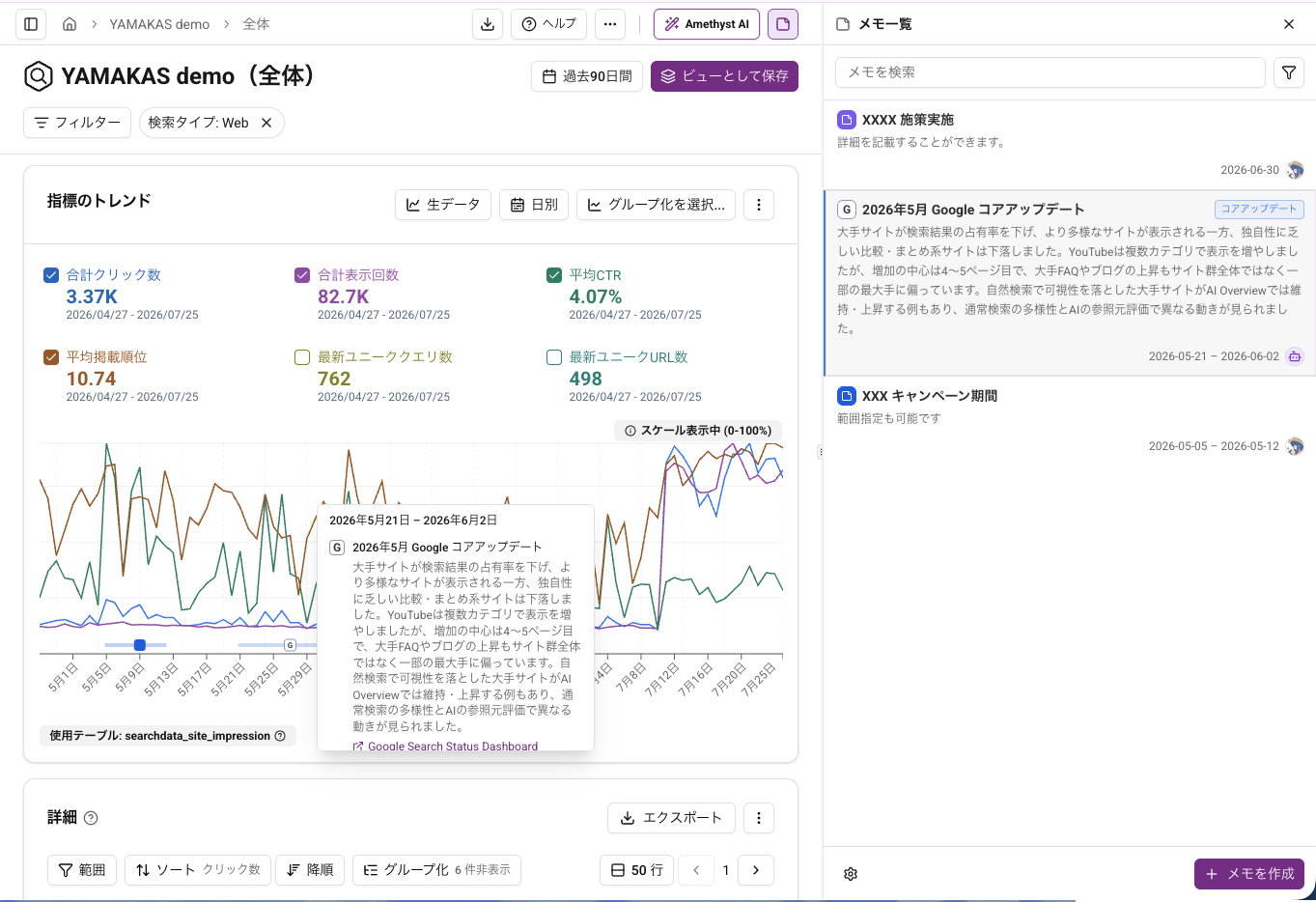
You can now leave notes about insights and initiatives on charts in Dashboard, Index Worker, Search Analytics, and User Analytics.
You can check a note from its symbol on a chart and open it in the right-side panel for more details. Notes can include labels and external links, and can be filtered by date range or label.
Initial analysis is now easier to start in User Analytics
After creating a User Analytics project, you can now run an initial analysis using connected BigQuery data and review suggested views, URL groups, and key events.
You can review the suggestions before applying them, reducing the manual setup needed to begin your analysis.
Projects and views can now be searched from the sidebar
You can now filter projects and views by name or ID from the search field at the top of the sidebar. Search works across Dashboard, Index Worker, Search Analytics, and User Analytics.
Partial matches, Japanese text, and case-insensitive searches are supported. When you finish searching, groups and projects return to their previous expanded or collapsed state.
Minor Changes
Improvements
- Gemini 3.1 Pro Preview is now available in AI chat. Existing Gemini 3 Pro Preview selections are migrated automatically.
- When BigQuery has not been configured while creating a Search Analytics or User Analytics project, you can now open the add dialog directly after moving to the settings page.
Bug Fixes
- Fixed an issue where URL group conditions containing Other could sometimes not be saved in User Analytics views.
- When
project.datasetorproject:datasetis entered as the Dataset name in Search Analytics BigQuery settings, only the dataset portion is now used if the Project ID matches. This automatically corrects specific input mistakes. - Fixed an issue where data synchronization could fail because of permission settings when importing Search Analytics data through the Search Console API.