.BwweyAj6_ZJlM9M.webp)
Monitoring rule suggestions are now available!
We bring you the latest updates for Amethyst.
Monitoring rule suggestions are now available
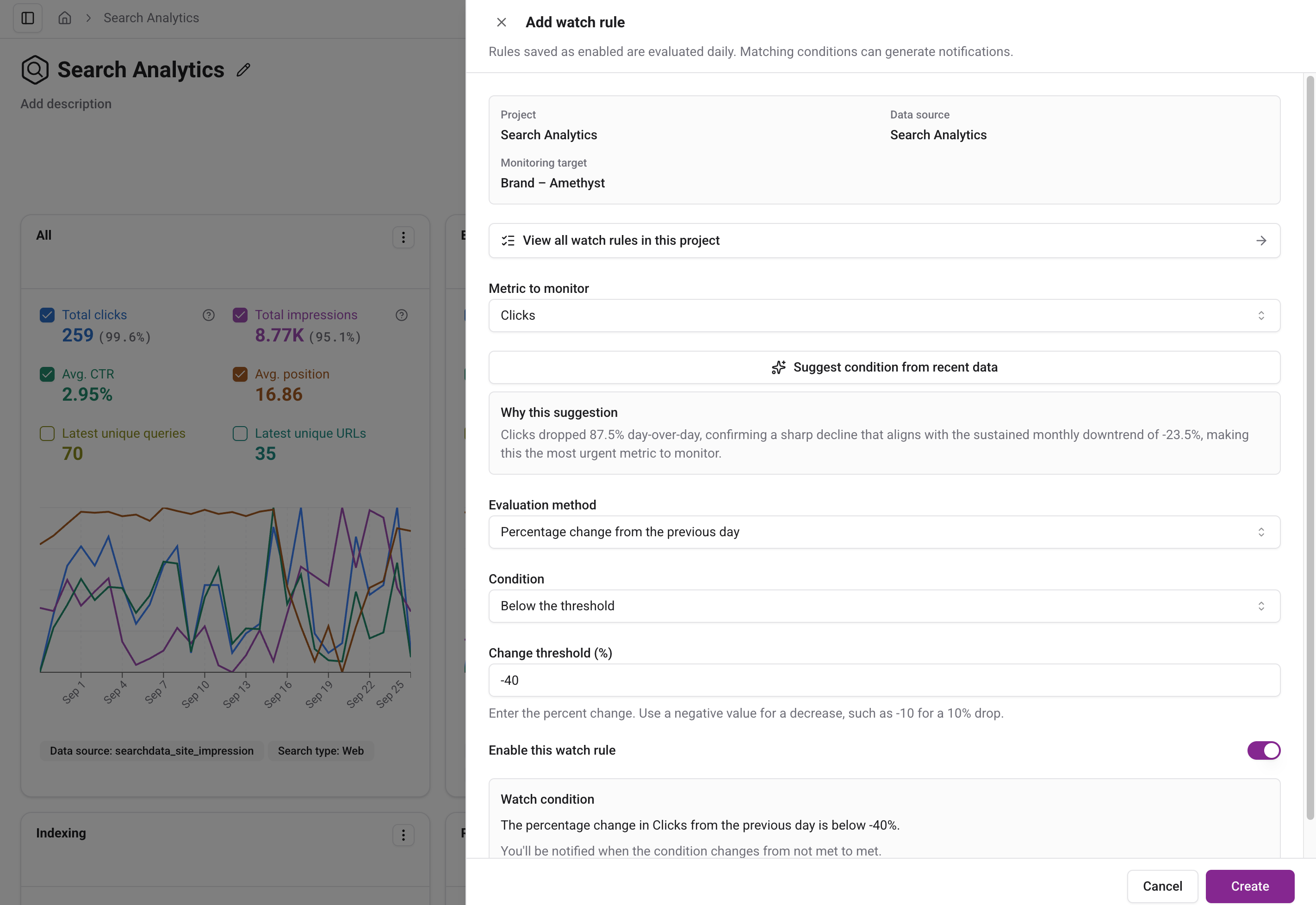
When creating or editing a monitoring rule, you can now get suggestions for the metric, comparison method, and threshold based on recent data. If you are unsure what to monitor or how much change should trigger a notification, use a suggestion as a starting point.
Suggestions are available for Search Analytics, User Analytics, and Index Worker. Click “Suggest condition from recent data” to fill in the metric, comparison method, and threshold and see the reasoning. Review the suggested conditions, adjust them as needed, and save the rule. Requesting a suggestion does not save it automatically.
You can continue to configure rules manually when a suggestion is unavailable, such as when there is not enough historical data.
Analysis controls are easier to use while scrolling
In Search Analytics, User Analytics, Index Worker, and dashboards, page controls now switch to a compact fixed header as you scroll. Table column headers follow beneath it, so you can use the controls while reviewing data.
The layout of action buttons has also been adjusted for long view names and narrow screens to reduce overlapping names and controls.
Minor Changes
Improvements
- BigQuery connection guides now provide more complete information about the permissions required for custom roles. Troubleshooting steps for connection issues have also been added to the public User Analytics documentation.
Bug Fixes
- Fixed an issue where the custom channel group column was missing from User Analytics detail exports.
- Fixed an issue where expanding or collapsing a project’s view list in the sidebar triggered the page navigation progress bar.
- Fixed timezone-related date display shifts for custom periods. Comparison periods can also be checked in the tooltip.
- Fixed links to Index Worker list and board pages that did not preserve the display language.